촬영 · 바로 확인 · 편집 인계RECORD · REVIEW · EDITORIAL HANDOFF収録 · すぐ確認 · 編集へ引き継ぎ
First Rush
여러 카메라를 한 번에 녹화하고, 방금 찍은 테이크를 바로 확인한 뒤, 정리된 촬영 정보와 함께 편집팀에 넘기세요. Record multiple cameras at once, play back the latest take, and send organized shoot details straight to editorial. 複数カメラをまとめて収録し、撮ったばかりのテイクをすぐ確認。整理された撮影情報ごと編集チームへ渡せます。
녹화부터 플레이백, 룩·노출 확인, 슬레이트 정리, 편집 인계까지 한 Mac에서 이어집니다. First Rush는 DeckLink·UltraStudio와 AJA Kona·Io X3의 지원되는 SDI 입력을 ProRes로 기록합니다. Keep recording, playback, look and exposure checks, slate organization, and editorial handoff on one Mac. First Rush records supported SDI inputs from DeckLink, UltraStudio, AJA Kona, and Io X3 in ProRes. 収録、プレイバック、ルック・露出確認、スレート整理、編集への引き継ぎまでを1台のMacでつなげます。First RushはDeckLink・UltraStudio、AJA Kona・Io X3の対応SDI入力をProResで収録します。
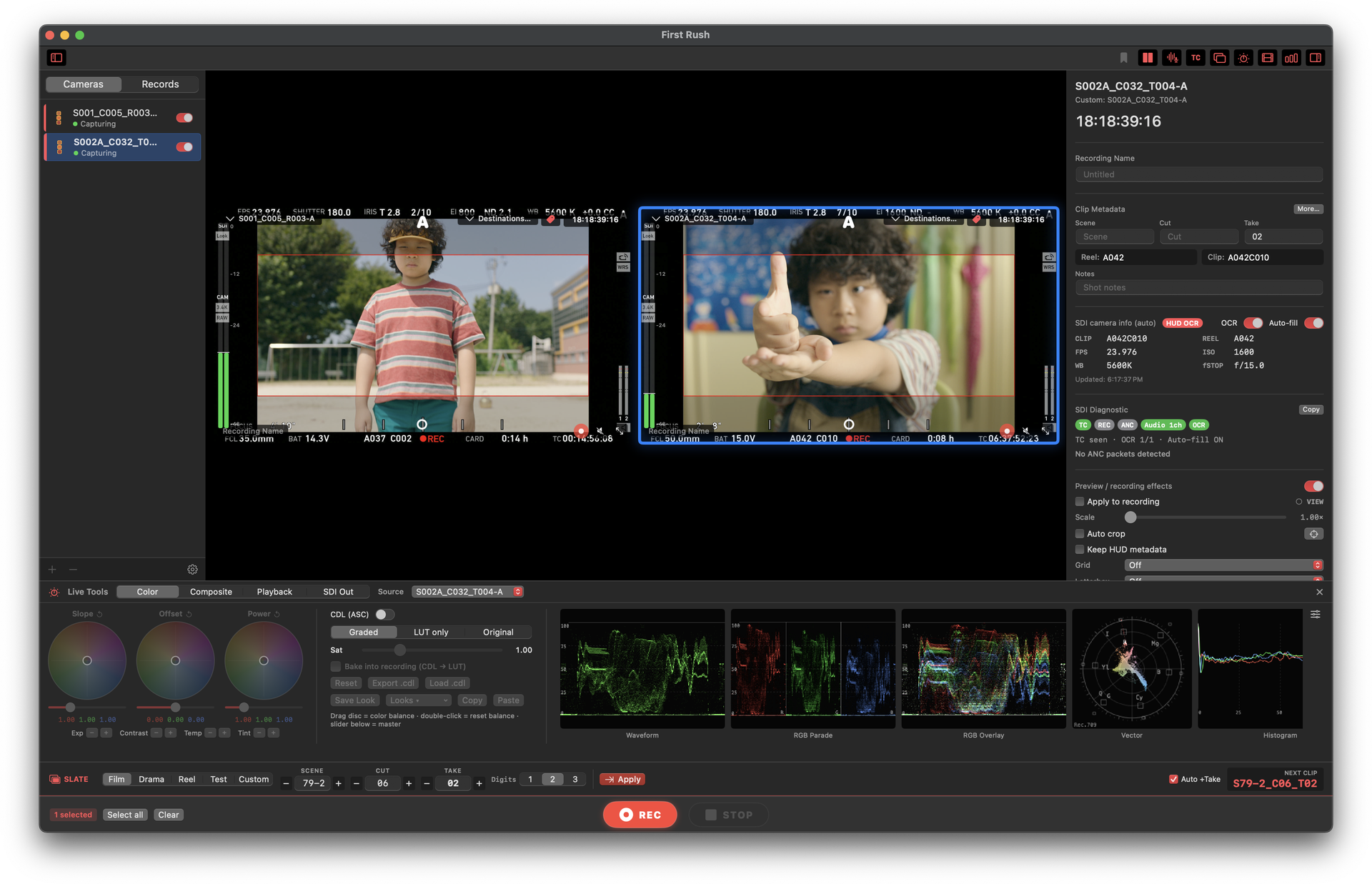
촬영부터 편집 인계까지SET TO EDITORIAL撮影から編集へ
촬영이 끝날 때면, 확인과 편집 인계도 함께 끝납니다.By wrap, the review and editorial handoff are ready too.撮影が終わる頃には、確認と編集への引き継ぎも整います。
카메라를 함께 굴립니다Roll multiple cameras together複数カメラをまとめて回す
마스터 카메라가 REC에 들어가면 지원되는 다른 SDI 채널도 함께 녹화를 시작합니다. 지원되는 Blackmagic 입력은 Pre-Record로 REC 직전 최대 30초까지 첫 클립에 담습니다.When the master camera rolls, the other supported SDI channels start recording with it. On supported Blackmagic inputs, Pre-Record adds up to 30 seconds before REC to the first clip.マスターカメラがRECに入ると、対応するほかのSDIチャンネルも同時に収録を開始。対応するBlackmagic入力では、Pre-RecordでREC前の最大30秒を最初のクリップへ加えます。
방금 찍은 테이크를 바로 돌려봅니다Play back the take while it is fresh撮ったばかりのテイクをすぐ確認
방금 찍은 테이크를 바로 돌려보고, 좋은 테이크와 다시 볼 구간을 표시해 팀과 공유하세요. 원본 클립은 그대로 유지됩니다.Play back the latest take, mark the selects and ranges worth revisiting, and share the decision with the crew. The source clip stays untouched.直前のテイクをすぐプレイバックし、OKテイクや見返す範囲をマークしてチームと共有。元のクリップはそのまま保たれます。
편집팀이 바로 시작할 수 있게 넘깁니다Hand off footage that editorial can use right away編集チームがすぐ始められる形で渡す
Scene·Shot·Take·Reel이 MOV와 촬영 보고서, FCPXML에 함께 담겨 편집팀이 다시 정리할 필요 없이 바로 시작할 수 있습니다. 녹화가 끝난 파일은 지정한 폴더로 옮기고 필요한 후처리도 이어서 실행합니다.Scene, Shot, Take, and Reel travel with the MOV files, camera reports, and FCPXML, so editorial can start without rebuilding the slate. Finished recordings move to the chosen folder and can continue into the post-processing step you set.Scene・Shot・Take・ReelをMOV、撮影レポート、FCPXMLへまとめるので、編集チームはスレートを入力し直さずに作業を始められます。収録済みファイルは指定フォルダへ移動し、設定した後処理へ続けられます。
멀티카메라 녹화MULTICAMERA RECORDINGマルチカメラ収録
여러 카메라와 오디오를 한눈에 보고, 한 번에 녹화하세요.See every camera and audio source at a glance, then roll them together.複数カメラと音声をひと目で確認し、まとめて収録。
각 카메라의 영상·오디오·타임코드와 슬레이트를 한 화면에서 보면서 채널별로 녹화합니다. DeckLink·UltraStudio, AJA Kona·Io X3와 외부 오디오를 지원합니다.Watch each camera’s video, audio, timecode, and slate in one view while recording every channel. First Rush supports DeckLink and UltraStudio, AJA Kona and Io X3, plus external audio.各カメラの映像・音声・タイムコード・スレートを1画面で確認しながら、チャンネルごとに収録。DeckLink・UltraStudio、AJA Kona・Io X3、外部音声に対応します。
- 지원되는 카메라의 REC에 맞춰 여러 채널이 함께 녹화Roll multiple channels together from a supported camera’s REC signal対応カメラのRECに合わせて複数チャンネルをまとめて収録
- 카메라 화면의 Clip·Reel·ISO·WB·Shutter를 촬영 정보로 자동 정리Automatically organize Clip, Reel, ISO, WB, and Shutter read from the camera displayカメラ画面から読み取ったClip・Reel・ISO・WB・Shutterを撮影情報として自動整理
- 편집과 마스터링 용도에 맞게 ProRes 선택Choose ProRes for editorial or mastering編集・マスタリング用途に合わせてProResを選択
- 긴 촬영도 자동 분할·루프 녹화로 이어가고 파일은 안전하게 마무리Keep long shoots rolling with Auto Split and loop recording, then close files safely長時間撮影も自動分割・ループ収録で続け、ファイルを安全に確定
FIRST RUSH 2.5
현장에서는 놓치지 않고, 편집실에서는 다시 정리하지 않게.Miss less on set. Rebuild less in editorial.現場で取りこぼさず、編集室で整理し直さない。
REH · PRE-RECORD
리허설부터 REC 직전까지 놓치지 않기Keep rehearsals and the moments before RECリハーサルからREC直前まで取りこぼさない
리허설은 Take 번호를 바꾸지 않고 _REH로 따로 정리됩니다. 지원되는 Blackmagic 입력에서는 REC 직전 최대 30초의 영상·오디오·타임코드도 첫 클립에 이어 담습니다.Rehearsals stay on the same Take number and are filed separately with _REH. On supported Blackmagic inputs, up to 30 seconds of pre-REC video, audio, and timecode are added to the first clip.リハーサルはTake番号を変えず、_REHで分けて整理されます。対応するBlackmagic入力では、REC直前の最大30秒の映像・音声・タイムコードも最初のクリップへ加えられます。
SHOT LIBRARY
원하는 촬영분을 바로 찾기Find the take you need fast必要なテイクをすぐ探す
촬영일이 달라도 파일명·카메라·Scene·Take로 원하는 촬영분을 찾으세요. 연결이 끊긴 미디어도 다시 연결해 바로 플레이백할 수 있습니다.Find the footage you need by file name, camera, Scene, or Take—even across shoot days. Relink offline media and send it straight to playback.撮影日が違っても、ファイル名・カメラ・Scene・Takeから必要な素材を検索。オフラインメディアも再リンクしてすぐプレイバックできます。
SAVED RANGES
다시 볼 구간만 간단히 저장Save only the ranges worth replaying見返す範囲だけを保存
다시 볼 구간의 IN/OUT과 앞뒤 여유, 반복 방식을 저장해도 원본은 그대로입니다. 클립마다 Saved Range와 Virtual Subclip을 각각 32개까지 둘 수 있습니다.Save IN/OUT, pre-roll, post-roll, and loop settings without changing the source. Each clip can hold up to 32 Saved Ranges and 32 Virtual Subclips.見返す範囲のIN/OUT、前後の余白、ループ設定を保存しても元メディアはそのまま。クリップごとにSaved RangeとVirtual Subclipを各32個まで作成できます。
WATCH FOLDER
녹화가 끝나면 정해둔 곳으로Move finished recordings where they belong収録が終わったら決めた場所へ
녹화가 안전하게 끝난 파일을 지정한 폴더로 자동 이동하고, 그 자리에서 필요한 후처리까지 이어서 실행합니다.Move completed recordings to the chosen folder automatically, then run the post-processing step you set at their destination.収録を終えたファイルを指定フォルダへ自動で移動し、移動先で設定した後処理まで続けて実行します。
SDI ROUTING · PLAYOUT
팀마다 필요한 화면 보내기Send each monitor the view it needs必要な映像を各モニターへ
지원되는 출력으로 클린 화면, 룩 적용 화면 또는 클립 플레이백을 필요한 현장 모니터에 보냅니다.Send clean video, a look-applied view, or clip playback through supported outputs to the monitors that need them.対応出力からクリーン映像、ルック適用映像、クリップ再生を必要な現場モニターへ送ります。
SLATE · FCPXML
촬영 정보를 편집팀까지 그대로Carry shoot details straight to editorial撮影情報をそのまま編集チームへ
Final Draft 장면 정보를 슬레이트로 불러오고, Scene·Shot·Take·Reel을 MOV·촬영 보고서·FCPXML에 함께 담습니다. 편집팀은 다시 입력하지 않고 바로 이어서 작업할 수 있습니다.Bring Final Draft scene information into the slate and carry Scene, Shot, Take, and Reel into MOV files, camera reports, and FCPXML. Editorial can continue without typing the details again.Final Draftのシーン情報をスレートへ取り込み、Scene・Shot・Take・ReelをMOV・撮影レポート・FCPXMLへまとめます。編集チームは入力し直さず、そのまま作業を続けられます。
룩·노출·모니터링LOOKS · EXPOSURE · MONITORINGルック · 露出 · モニタリング
촬영 중에 룩과 노출을 확인하고, 필요한 화면을 팀과 공유합니다.Judge the image on set and share the right view with the crew.現場で画を判断し、必要な表示をチームへ共有。
원본과 룩을 나란히 비교하고, 노출·색·간단한 합성을 촬영 중 바로 확인하세요. 감독·촬영팀·클라이언트 모니터에는 각자 필요한 화면을 보낼 수 있습니다.Compare the original and look-applied image side by side, check exposure, color, and simple composites while shooting, and send the right view to the director, camera crew, or client monitor.元映像とルック適用映像を並べて比較し、露出・色・簡易合成を撮影中にすぐ確認。監督、撮影チーム、クライアントの各モニターへ必要な映像を送れます。
룩 비교Look comparisonルック比較
원본과 룩 적용 화면을 바로 비교하고, 결정한 룩은 CDL로 저장Compare the original and look-applied image instantly, then save the chosen look as CDL元映像とルック適用映像をすぐ比較し、決めたルックをCDLで保存
노출·색 확인Exposure & color露出・色確認
스코프와 False Color로 노출과 색 균형을 촬영 현장에서 확인Use scopes and False Color to judge exposure and color balance on setスコープとFalse Colorで露出とカラーバランスを撮影現場で確認
현장 합성On-set compositing現場合成
VFX 플레이트나 그래픽을 겹쳐 촬영 결과를 현장에서 미리 확인Overlay VFX plates or graphics to preview the shot on setVFXプレートやグラフィックを重ね、撮影結果を現場でプレビュー
모니터 출력Monitor outputモニター出力
Program Out으로 클린 화면이나 룩 적용 화면을 필요한 모니터에 전달Use Program Out to send a clean or look-applied view to the monitor that needs itProgram Outでクリーン映像やルック適用映像を必要なモニターへ送信
iPhone·iPad 현장 모니터IPHONE · IPAD CREW MONITORiPhone · iPad現場モニター
First Rush Viewer
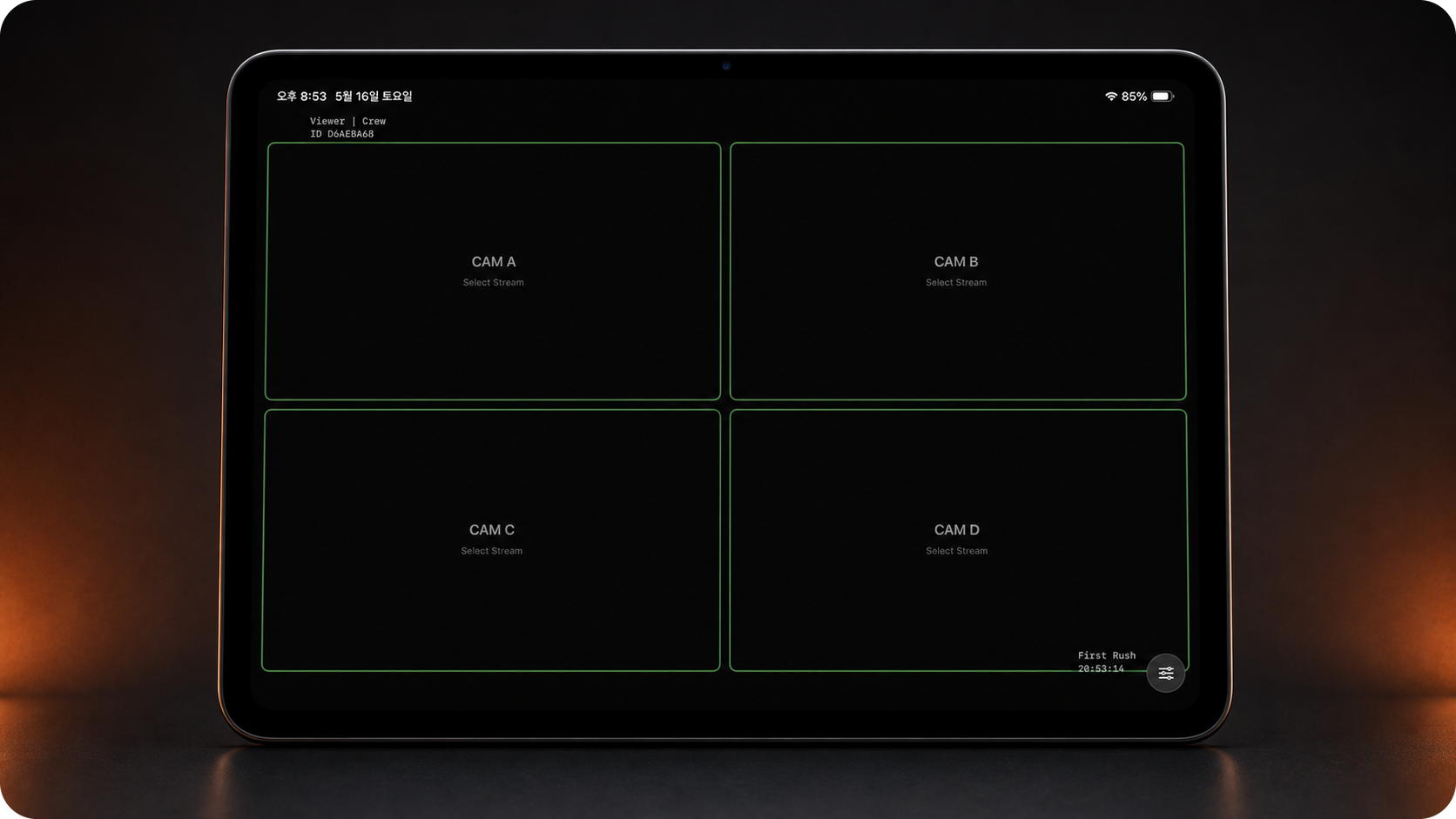
감독과 촬영팀이 레코더 앞에 모이지 않고도 iPhone과 iPad에서 최대 4개 카메라를 실시간으로 확인합니다. 녹화는 Mac에서 계속되고, Viewer는 보기 전용으로 연결됩니다.Let directors and crew monitor up to four cameras live on iPhone and iPad without crowding around the recorder. Recording stays on the Mac; Viewer connects as a view-only monitor.レコーダーの前に集まらなくても、監督や撮影チームがiPhone・iPadで最大4台のカメラをリアルタイムに確認できます。収録はMacで続き、Viewerは表示専用モニターとして接続します。
- 6자리 코드 또는 QR로 빠르게 연결Connect quickly with a six-digit code or QR6桁コードまたはQRですばやく接続
- 1~4개 카메라에 맞춘 화면 배치Layouts for one to four cameras1〜4カメラ対応レイアウト
- 프레임레이트·지연·연결 상태를 한눈에 확인See frame rate, latency, and connection status at a glanceフレームレート・遅延・接続状態をひと目で確認
- 촬영 클립은 Mac에만 두고, iPhone과 iPad는 보기 전용으로 연결Keep recorded clips on the Mac while iPhone and iPad stay view-only収録クリップはMacだけに置き、iPhone・iPadは表示専用で接続
무료로 써보기TRY IT FREE無料で試す
먼저 7일 동안 실제 촬영에 써보고, 월간 또는 연간으로 이어가세요.Use every feature on a real shoot for seven days, then choose monthly or annual.まずは7日間、実際の撮影で全機能を試し、その後は月額または年額を選べます。
웹사이트 구독 가격에는 VAT가 포함되지 않습니다. 결제 시 거주 국가에 따라 세금이 추가됩니다.Website subscription prices exclude VAT. Applicable tax is added at checkout based on your country.ウェブサイトのサブスクリプション価格にVATは含まれません。決済時に居住国に応じた税金が追加されます。
무료 체험Free trial無料トライアル
7일7 days7日間
- 실제 촬영에서 모든 기능 사용Use every feature on a real shoot実際の撮影で全機能を使用
- 앱에서 바로 7일 체험 시작Start the seven-day trial in the appアプリから7日間体験を開始
월간Monthly月額
₩20,000 / 월/ month/ 月
- 모든 기능 포함All features included全機能込み
- 1 라이선스 = 1 MacOne license = one Mac1ライセンス = 1 Mac
2개월 절약Save 2 months2か月分お得
연간Annual年額
₩200,000 / 연/ year/ 年
- 모든 기능 포함All features included全機能込み
- 1 라이선스 = 1 MacOne license = one Mac1ライセンス = 1 Mac
한국 Mac App Store 현재 가격: 월 ₩23,000 · 연 ₩230,000. 다른 국가에서는 스토어 통화와 가격이 다를 수 있습니다.Current Korean Mac App Store price: ₩23,000/month · ₩230,000/year. Currency and pricing vary by storefront.韓国Mac App Storeの現在価格:月₩23,000 · 年₩230,000。ほかの国では通貨・価格が異なる場合があります。 Mac App Store ↗
첫 촬영 시작하기GET READY FOR THE FIRST SHOOT最初の撮影を始める
연결하고, 설치하고, 바로 첫 테이크를 굴리세요.Connect, install, and roll your first take.接続してインストールしたら、最初のテイクへ。
캡처 하드웨어 드라이버 설치Install the capture hardware driverキャプチャハードウェアのドライバーをインストール
First Rush 설치Install First RushFirst Rushをインストール
다운로드한 First Rush를 응용 프로그램 폴더에 넣습니다.Open the DMG and drag First Rush into Applications.DMGを開き、First Rushをアプリケーションフォルダへ移動します。
무료 체험 시작 또는 라이선스 활성화Start the free trial or activate a license無料トライアル開始またはライセンス認証
앱의 라이선스 화면에서 7일 무료 체험을 시작하거나 발급받은 키를 입력합니다. 다른 Mac으로 옮길 때는 기존 Mac에서 먼저 비활성화(Deactivate)하세요.In the License screen, start the free seven-day trial or enter the key you received. Before moving the license to another Mac, deactivate it on the current Mac.アプリのLicense画面で7日間の無料トライアルを始めるか、発行されたキーを入力します。別のMacへ移す前に、現在のMacで先にDeactivateしてください。
시스템Systemシステム
macOS 12 Monterey+ · Apple SiliconAJA는 macOS 14 Sonoma 이상 · RAM 8 GB 이상 · 4K 멀티채널은 16 GB 이상 권장AJA requires macOS 14 Sonoma+ · 8 GB RAM minimum · 16 GB+ recommended for 4K multichannelAJAはmacOS 14 Sonoma以降 · RAM 8 GB以上 · 4Kマルチチャンネルは16 GB以上推奨캡처 하드웨어Capture hardwareキャプチャハードウェア
DeckLink · UltraStudio · AJA Kona · Io X3SDI 출력 포맷과 커넥터 지원은 하드웨어에 따라 다를 수 있습니다.SDI output formats and connector support can vary by hardware.SDI出力フォーマットとコネクタ対応は機種により異なります。예상 저장 용량Estimated storageストレージ使用量の目安
4K 30p / channelProRes Proxy ≈ 2 GB/min · ProRes HQ ≈ 7 GB/min도움말Helpヘルプ
촬영을 멈추지 말고, 바로 답을 찾으세요.Find answers without holding up the set.現場を止めずに、すぐ解決。
First Rush 사용법, 설치, 라이선스를 11개 언어로 물어보세요. 결제·환불·계정 문의는 이메일로 직접 도와드립니다.Ask how to use First Rush, set it up, or manage a license in 11 languages. For billing, refunds, or account issues, contact us directly by email.First Rushの使い方、セットアップ、ライセンスについて11言語で質問できます。決済・返金・アカウント関連はメールで直接対応します。
AI 답변은 부정확할 수 있습니다. 결제·환불 등 계정 문의는 editor_han@me.com으로 연락주세요.AI answers may be imperfect. For billing, refunds, or account issues, contact editor_han@me.com.AIの回答は不正確な場合があります。決済・返金などアカウント関連のお問い合わせは editor_han@me.com までご連絡ください。
FIRST RUSH 3.8.1 · BUILD 3801